


Unix/Linux Tutorial
This tutorial provides an introduction to using basic Unix/Linux commands. The examples for this tutorial are illustrated using Southern Methodist University's Lyle Genuse Unix/Linux accounts.
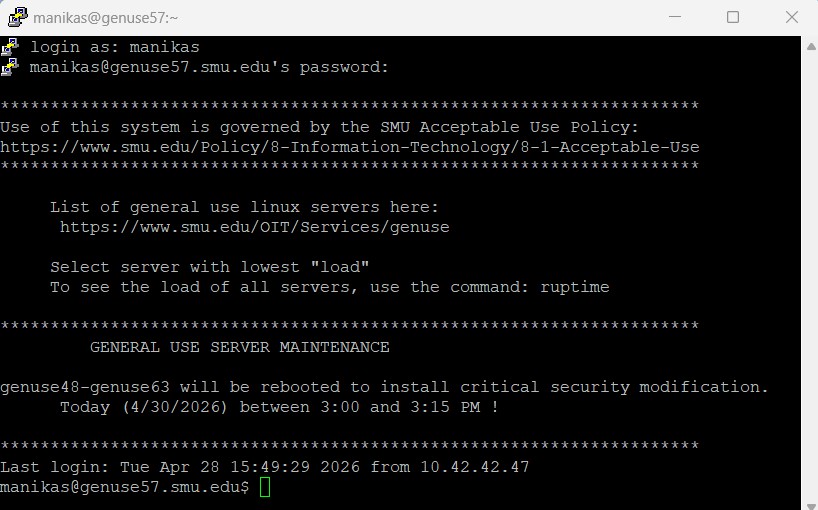
- Login to your Genuse account using the terminal window program (e.g., PuTTY) installed on your PC:

- Create new directory using the mkdir (make directory) command: Create your new project directory "CS2340" using the command mkdir CS2340
- Change current directory using the cd (change directory) command: Change to your new Project1 directory using the command cd CS2340
- Find out where you are using the pwd print working directory) command: Use the command pwd to show your current directory name.

- Now create a new directory within the "CS2340" directory named "Project1", using the command mkdir Project1
- List your files and directories in the current directory using the ls (list) command: Use the command ls to list all the files in your CS2340 directory. Note that your CS2340 directory now contains your newly created "Project1" directory:

- Change your current directory to the "Project1" directory using the command cd Project1
- Use the command pwd to show your current directory name.
- List your files in the current directory using the ls (list) command. Note that the "Project1" directory is currently empty, as you just created this directory:

- Download the text file readme.txt to your PC.
- Using either WinSCP or Cyberduck, copy this text file from your PC to your Project1 directory in your Genuse account.
- Now use the command ls again to list all the files in your Project1 directory. You should now see the transferred "readme.txt" file in your directory list
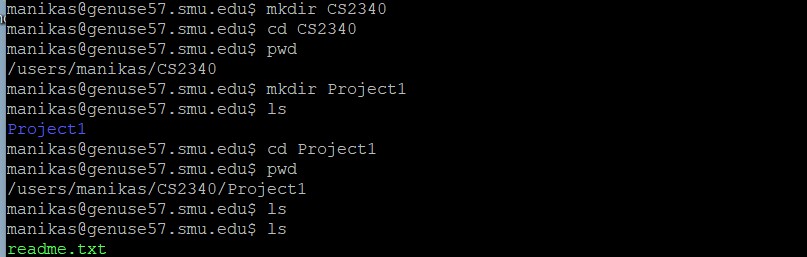
- Here is an image of the complete set of commands that we used in this tutorial exercise:

These commands are the basic Unix/Linux commands that you will often use. For additional commands, please see the site UNIX Tutorial for Beginners.
T. Manikas
Last update 2026 May 28